 Photoscape 3.7
Screenshots of Photoscape

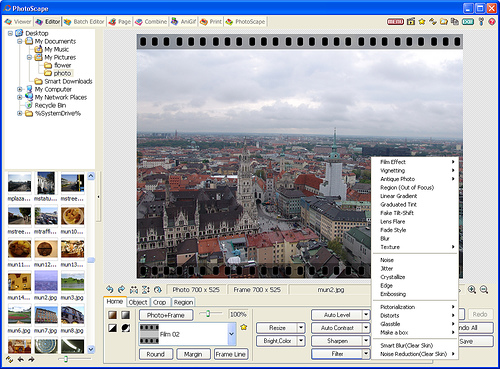


Photoscape Editor's Review
Photoscape is a free photo editing software created in a user-friendly manner. I would say it's an all-in-one application that offers all the basics to fix or enhance your collection of photos.
From the beginning you are amazed by its simplicity and unique design which gives you total control of the editing tools. Every major function is represented by a tab which uses the same window like all the others. In this way you have different major modules into a single executable so you can instantly access the viewer, the editor, or the animated GIF function.
The first contact with this application is a childish experience, but as you go deeper into its options you will discover its complexity. It delivers a set of editing tools such as Red Eye Correction, Paint Brush, Clone Stamp. But also some enhancing tools like Page (you can create a collage based on defined layers), Combine (you can create posters from several images bound together), or Animated GIF (you can create a GIF sequence by using you own photos). Let's not forget the batch editor, the screen capture tool or the RAW converter.
Theoretically, Photoscape can run on any computer configuration if you take also in consideration the portable edition of it, but you should be aware that the support for Win95, Win98, WinMe has been discontinued since version 3.5.
Pluses: user-friendly interface, lots of premium editing tools.
Drawbacks / flaws: If you work with more than one project active, the application consumes additional memory. You can easily use up to 300,000 Kb of used memory.
In conclusion: It's still a mystery how such a great application is free. You get so much for nothing compared to other similar software which can cost you around 29$, or maybe $49.
Photoscape Publisher's Description
Easy photo editing software that enables you to fix and enhance photos. Photoscape is provided free of charge.
Key Features:
- Viewer: View photos in your folder, create a slideshow
- Editor: resizing, brightness and color adjustment, white balance, backlight correction, frames, balloons, mosaic mode, adding text, drawing pictures, cropping,...
What's New in Version 3.7 of Photoscape
- Added a 'Smart Blur' brush (Editor > Tools > Effect Brush)
- Brush sizes increase from 3 to 4 and become bigger.
- Added 29 more film effects so totally 35 film effects now. (Editor > Home)
- Improved the 'Film Effect' UI
- Fixed minor bugs
Other Languages
Look for Similar Items by Category
Feedback
- If you need help or have a question, contact us
- Would you like to update this product info?
- Is there any feedback you would like to provide? Click here
Popular Downloads
-
 Macromedia Flash 8
8.0
Macromedia Flash 8
8.0
-
 Kundli
4.5
Kundli
4.5
-
 My Talking Tom
1.0
My Talking Tom
1.0
- FastSum 1.9
-
 FastSum Standard Edition
1.6
FastSum Standard Edition
1.6
-
 Cool Edit Pro
2.1.3097.0
Cool Edit Pro
2.1.3097.0
-
 Cheat Engine
6.8.1
Cheat Engine
6.8.1
-
 Hill Climb Racing
1.0
Hill Climb Racing
1.0
-
 Windows XP Service Pack 3
Build...
Windows XP Service Pack 3
Build...
-
 C-Free
5.0
C-Free
5.0
-
 Tom VPN
2.2.8
Tom VPN
2.2.8
- HP LaserJet 1100 Printer Drivers 4.3.2.5
-
 Horizon
2.9.0.0
Horizon
2.9.0.0
-
 Iggle Pop
1.0
Iggle Pop
1.0
- HP WLAN 802.11a/b/g W500 2.4.1.30
-
 Mozilla Firefox
108.0...
Mozilla Firefox
108.0...
-
 FormatFactory
4.3
FormatFactory
4.3
- HP Deskjet 5400 Series (DOT4) 9.0.0.0
- HP LaserJet 4200 PS 60.3.14.2
-
 Vector on PC
1.0
Vector on PC
1.0